Mpp Viewer4.0
Publisher Description
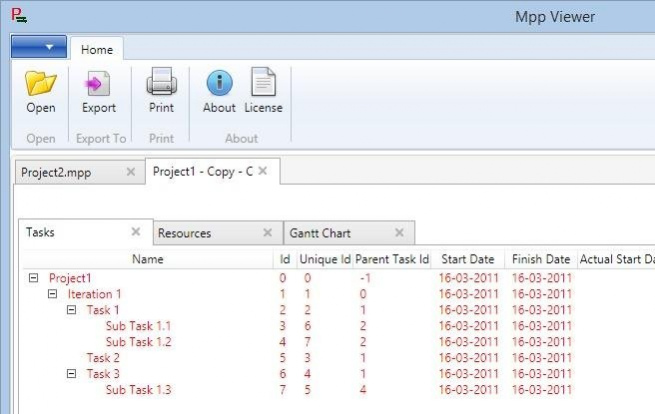


MPP Viewer is a simple viewer for Microsoft Project files. It allows you to Open, Export to excel, Print mpp files. It works well with Project 2016 / 2007 / 2003 / 2000 files. Allows hierarchical view of tasks, resources view and more.
MPP Viewer 4.0 Beta
1. Support for viewing Notes
2. Addition of resources column in excel export
3. Addition of % complete column in resources view
4. Upgrade of MPXJ library to use v5.9
5. Bug fixes
MPP Viewer 3.0 - New features include
1. Support for viewing custom columns
2. Preview of notes
3. Project properties
MPP Viewer 2.0 is more stable version and works well with most of the files 1.0 was not able to work with.
NOTE:
1. MPP Viewer 4.0 needs .Net framework 4.6.2 to run.
2. If you are running Windows XP, Please use MPP Viewer 1.0. Since .Net 4.5 is not available for Windows XP
- View tasks in hierarchy
- View Task details
- View Resources with associated tasks
- View Resources details
- Export the project task and resource information to
- Allows multiple project documents to be open at the same time
- Allows printing tasks in the project file
- Filter tasks by Completed, Not Complete, Completing Today, Completing today
- Highlight tasks not complete passed due date
- Gantt chart
- Recently opened files are listed in the main menu
- Search for text in the task name field from all the tasks / subtasks
- Logging in case of any unhandled / critical exceptions for better error reporting and is saved in mppviewertrace.log file
- User can associate .mpp files with Mpp Viewer from Windows explorer (Right Click -> Open with)
- Support for Custom columns
- View project properties
- Preview notes in the Tasks view
About Mpp Viewer
This Project Management program is available in English. It was last updated on 29 September, 2026. Mpp Viewer is compatible with the following operating systems: Linux, Mac, Windows.
The company that develops Mpp Viewer is kvivek23. The latest version released by its developer is 4.0. This version was rated by 7 users of our site and has an average rating of 4.9.
The download we have available for Mpp Viewer has a file size of 17.2 MB. Just click the green Download button above to start the downloading process. The program is listed on our website since 2017-05-01 and was downloaded 458 times. We have already checked if the download link is safe, however for your own protection we recommend that you scan the downloaded software with your antivirus. Your antivirus may detect the Mpp Viewer as malware if the download link is broken.
How to install Mpp Viewer on your Windows device:
- Click on the Download button on our website. This will start the download from the website of the developer.
- Once the Mpp Viewer is downloaded click on it to start the setup process (assuming you are on a desktop computer).
- When the installation is finished you should be able to see and run the program.
Program Details
System requirements
Download information
Pricing
Version History
version 4.0
posted on 2017-05-01
version Binaries
posted on 2011-03-21
Several fixes and updates
